Backup Recovery Testing
Automated, validated recovery testing to ensure your backups are truly ready when disaster strikes.
Validated Recoverability
Backups are only valuable if they restore successfully. We continuously verify your recovery capability.
Screenshot Verification
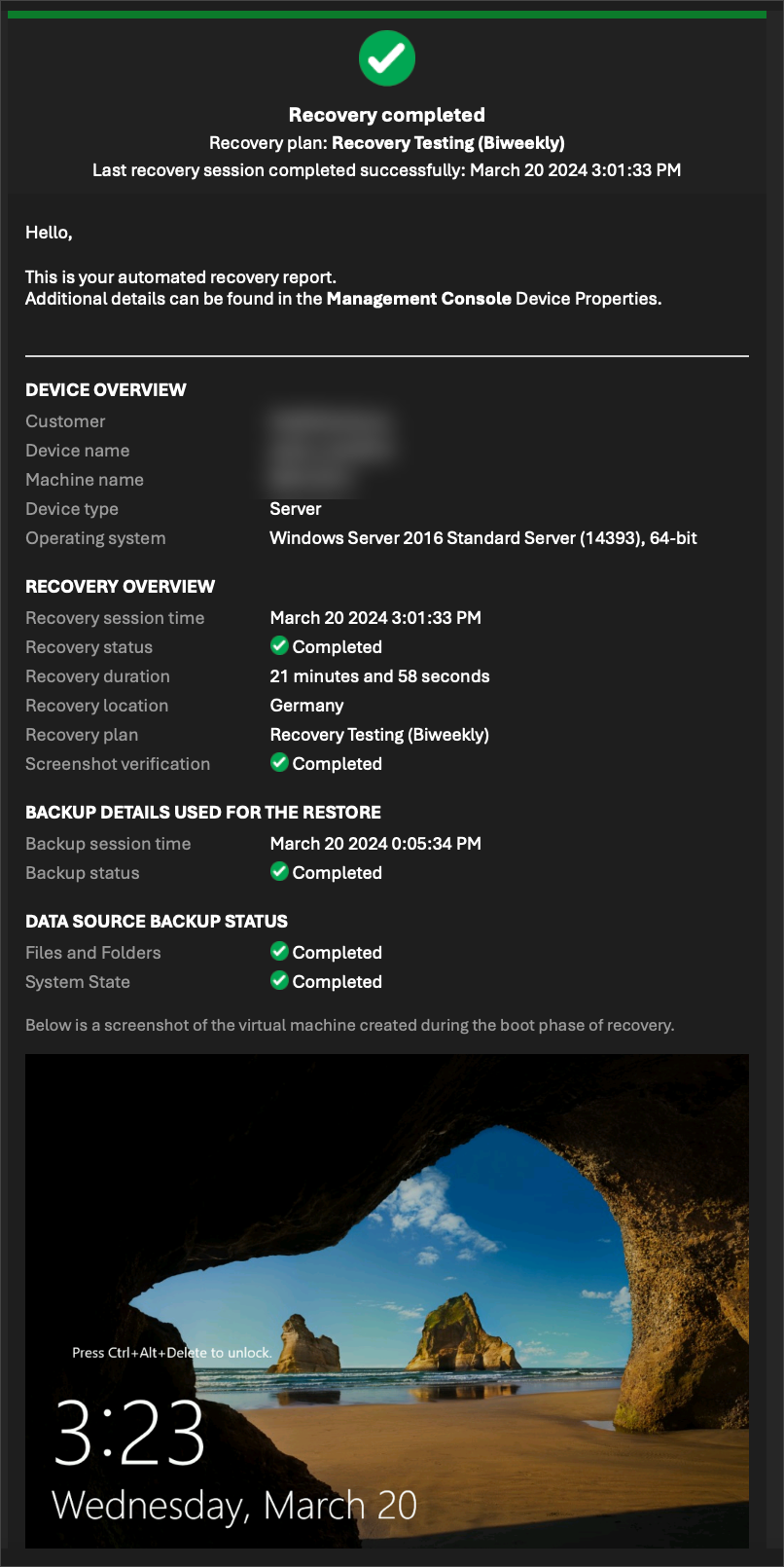
Every test includes visual confirmation that your system successfully booted and recovered.
Automated Scheduling
Windows servers are automatically tested every 14 or 30 days based on your recovery objectives.
Cloud Test Environment
We spin up an isolated cloud environment to safely validate your backup integrity.
Automatic Cleanup
Once testing is complete, the environment is securely removed to minimize exposure.
Detailed Reporting
You receive clear, accessible reports confirming backup success and readiness.
How Backup Recovery Testing Works
Isolated Cloud Spin-Up
Your selected backup is restored inside a secure, temporary cloud testing environment.
System Verification
The restored server is validated and screenshot evidence is captured to confirm successful boot.
Cleanup & Reporting
The test environment is securely removed and a structured recovery report is delivered.
Be Ransomware-Ready. Be Recovery-Ready.
Don’t wait for a disaster to discover your backups fail. Proactive recovery testing ensures your business can continue operating — even during ransomware, hardware failure, or accidental deletion.
What Your Recovery Report Looks Like
Every recovery test generates a structured report with visual verification, confirming your system restored successfully.
Technical Requirements & Service Scope
Backup Recovery Testing is designed to validate recoverability for supported systems and configurations. To ensure accurate and secure testing, the following technical requirements apply:
- Supported on Backup Manager version 17.4 and above
- Not compatible with software-only device configurations
- Maximum selected protected size per device: 2 TB
- Supports System State, Files & Folders, and Microsoft SQL recovery validation
- 64-bit architecture required (32-bit systems not supported)
- Maximum virtual disk size supported: 64 TB per disk
- Devices assigned to Standby Image plans cannot be enrolled in Recovery Testing
For environments exceeding these parameters, custom validation or restore testing services may be available upon request.
Business Continuity & Disaster Recovery Options
When disruption happens, recovery speed matters. We configure and manage structured recovery pathways — allowing systems to be restored on-demand or maintained in a standby-ready state.
On-Demand Virtual Recovery
- Restore to Hyper-V (local or VHDX)
- Restore to VMware ESXi (VMDK)
- Restore to Microsoft Azure Virtual Machine
- Full system image recovery
- File-level recovery available
Recovery infrastructure such as hypervisors, Azure subscriptions, storage, and compute resources are not included unless separately contracted.
Standby Image (Continuous Virtual Readiness)
- Standby Image to Hyper-V
- Standby Image to VMware ESXi
- Standby Image to Microsoft Azure
- Configurable update frequency
- Reduced downtime recovery scenarios
We manage configuration and monitoring. Infrastructure remains client-owned or separately provisioned.